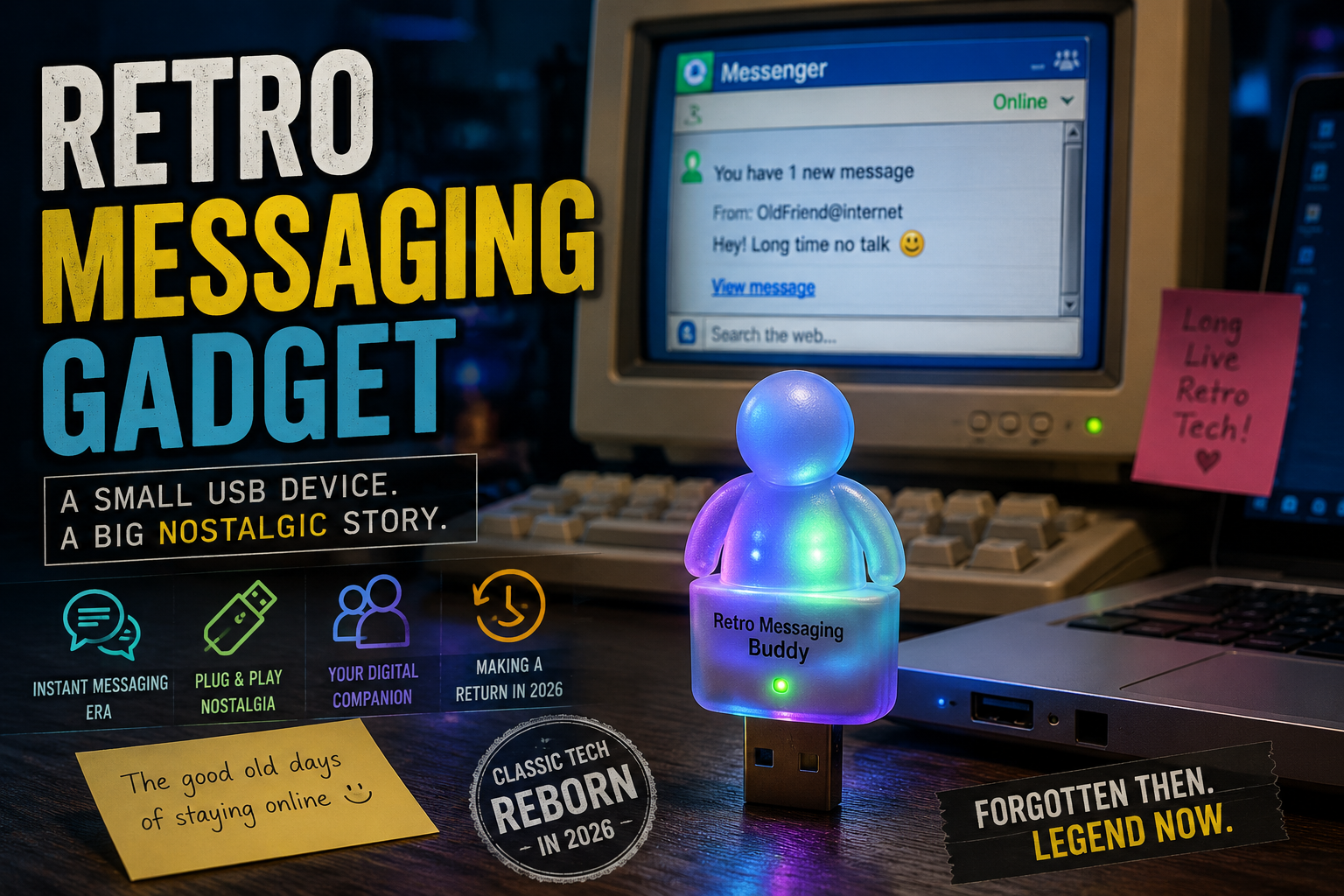

MSN Messenger’s Forgotten Hardware: The Fascinating Return of the i-Buddy USB Accessory in 2026
Introduction
MSN Messenger i-Buddy Long before smartphones dominated communication and social media platforms became the centre of online interaction, millions of people around the world relied on a simple messaging service to stay connected with friends and family. That service was MSN Messenger.
For an entire generation of internet users, MSN Messenger represented much more than a chat application. It was a cultural phenomenon that shaped how people communicated online. Users spent hours customising status messages, exchanging emoticons, sharing personal updates, and waiting eagerly for friends to come online. The iconic notification sounds and colourful interface became defining elements of the early internet experience.
Among the many accessories created during MSN Messenger’s peak popularity, one gadget stood out from the rest: the i-Buddy USB accessory. This small desktop companion transformed digital notifications into physical experiences. It could flash lights, move its wings, and respond to incoming messages, making online conversations feel surprisingly tangible.
While MSN Messenger disappeared years ago, interest in retro technology has continued to grow. In 2026, technology enthusiasts and hardware hackers successfully revived the i-Buddy, bringing this forgotten accessory back to life. The project captured the attention of retro computing communities worldwide and demonstrated how old technology can remain relevant through creativity and preservation.
This article explores the history of MSN Messenger, the story of the i-Buddy accessory, its unexpected revival, and what this fascinating project reveals about nostalgia, technology preservation, and the enduring appeal of physical computing experiences.
What Was MSN Messenger?
MSN Messenger was one of the most influential instant messaging platforms in internet history. Introduced during the early days of widespread internet adoption, it helped millions of users communicate in real time.
Before social media platforms became dominant, instant messaging applications served as the primary way people interacted online. MSN Messenger allowed users to create contact lists, exchange text messages, send files, and participate in group conversations.
The platform became especially popular among teenagers, students, and young professionals. It provided a simple and convenient way to stay connected without relying on email or expensive phone calls.
Several features helped MSN Messenger stand out:
- Real-time text communication
- Custom status messages
- Animated emoticons
- Display pictures
- File sharing
- Voice conversations
- Video chat capabilities
- Personal profile customization
At a time when internet speeds were relatively slow and social networking platforms were still evolving, MSN Messenger offered a remarkably engaging communication experience.
The Rise of Instant Messaging Culture
To understand the significance of MSN Messenger, it is important to understand the online environment of the early 2000s.
Internet users were discovering new ways to communicate digitally. Email was useful but lacked immediacy. Online forums encouraged discussion but were not designed for personal conversations. Instant messaging filled a critical gap.
Users could see who was online and start conversations instantly. This created a new social dynamic that had never existed before.
Common routines included:
- Logging in after school
- Updating personal status messages
- Waiting for specific friends to appear online
- Joining group chats
- Sharing music recommendations
- Discussing homework or projects
- Building online friendships
MSN Messenger became a daily habit for millions of people.
Many users still remember the excitement of hearing the notification sound that signalled a new message. These seemingly small interactions created powerful emotional connections that continue to fuel nostalgia decades later.
Why MSN Messenger Became So Popular
Several factors contributed to MSN Messenger’s enormous success.
Easy Accessibility
The software was free and easy to install. Anyone with an internet connection could create an account and start chatting.
Personal Expression
Unlike many communication platforms of the time, MSN Messenger encouraged personalisation.
Users could customise:
- Screen names
- Status messages
- Profile pictures
- Background colors
- Emoticon collections
This level of customisation helped users express their personalities online.
Social Connectivity
MSN Messenger created a sense of presence. Seeing friends online felt almost like being together in the same room.
The platform blurred the line between digital and physical social interaction.
Constant Innovation
Throughout its lifespan, MSN Messenger regularly introduced new features that kept users engaged.
These included:
- Winks
- Nudges
- Animated emoticons
- Webcam support
- Voice calls
- Shared activities
The platform evolved continuously, maintaining its appeal as internet technology advanced.
The Birth of the i-Buddy
As MSN Messenger grew in popularity, companies began creating accessories designed to enhance the messaging experience.
One of the most memorable products was the i-Buddy.
At first glance, the device appeared to be a simple decorative gadget. It featured a colourful, friendly design that resembled a small cartoon character.
However, the i-Buddy was much more than a desk ornament.
Connected through a USB port, it interacted directly with MSN Messenger notifications and user activities.
The device could:
- Illuminate with different colors
- Move its wings
- Rotate components
- React to incoming messages
- Respond to user status changes
The concept was surprisingly innovative for its time.
Instead of relying solely on screen-based notifications, users could physically see and interact with their messaging activity through a real-world object.
How the i-Buddy Worked
The i-Buddy connected to a computer using a standard USB interface.
Special software allowed it to communicate with MSN Messenger and other applications.
When certain events occurred, the device responded automatically.
Examples included:
| Event | Physical Response |
|---|---|
| New message | Flashing lights |
| Friend online | Wing movement |
| Incoming notification | Color changes |
| Custom triggers | User-defined actions |
The gadget effectively translated digital information into physical behaviour.
Today, this concept might sound familiar because modern smart home devices often operate in similar ways.
However, when the i-Buddy was introduced, this type of interactive hardware was highly unusual.
In many ways, it anticipated modern trends in connected devices and ambient computing.
The Appeal of Physical Notifications
Modern technology has become increasingly screen-focused.
Smartphones, tablets, laptops, and smartwatches constantly compete for our attention through visual alerts and sounds.
The i-Buddy offered a different approach.
Instead of displaying notifications on a screen, it existed as a physical object within a user’s environment.
This created several unique benefits:
Reduced Screen Dependency
Users did not need to constantly check software windows.
The accessory provided awareness through physical movement and lighting.
Emotional Engagement
Humans naturally respond to physical objects.
A moving, glowing desktop companion felt more engaging than a simple pop-up notification.
Ambient Awareness
The device communicated information without demanding immediate attention.
This concept has become increasingly important in modern interface design.
The Golden Era of USB Gadgets
The i-Buddy emerged during a fascinating period in technology history.
The early and mid-2000s witnessed an explosion of creative USB accessories.
Manufacturers experimented with a wide variety of unusual products:
- USB rockets
- Mini fans
- Desktop pets
- Message displays
- Toy robots
- Animated decorations
- LED devices
- Interactive gadgets
Many of these products would seem impractical today.
Yet they reflected an era of experimentation and excitement surrounding personal computing.
Technology companies were exploring ways to make computers feel more personal, entertaining, and expressive.
The i-Buddy perfectly captured this spirit.
Why People Still Remember the i-Buddy
Many technology products disappear without leaving a lasting impression.
The i-Buddy is different.
Several factors contribute to its enduring popularity.
Distinctive Design
Its colourful appearance immediately stood out.
Unlike generic accessories, it had personality.
Emotional Connection
The device became associated with friendships, conversations, and daily online routines.
These emotional memories remain powerful years later.
Technological Uniqueness
The combination of software and physical interaction felt futuristic.
Even by modern standards, the concept remains charming and innovative.
Rarity
As MSN Messenger faded away, working i-Buddy devices became increasingly difficult to find.
Scarcity often increases interest among collectors and enthusiasts.
The Decline of MSN Messenger
No technology remains dominant forever.
As internet usage evolved, new communication platforms emerged.
Several factors contributed to MSN Messenger’s decline.
Rise of Social Networks
Social networking platforms began integrating messaging features directly into their ecosystems.
Users no longer needed separate applications for communication.
Smartphone Revolution
Mobile devices transformed how people interacted online.
Traditional desktop messaging platforms struggled to adapt quickly enough.
Increased Competition
New services offered modern features and improved user experiences.
The market became increasingly crowded.
Changing User Expectations
Consumers began demanding cross-platform compatibility, mobile accessibility, and seamless integration across devices.
Older messaging systems faced growing challenges meeting these expectations.
Eventually, MSN Messenger reached the end of its lifecycle, marking the conclusion of a significant chapter in internet history.
What Happened to i-Buddy After MSN Disappeared?
The decline of MSN Messenger created a major problem for the i-Buddy.
Its functionality depended heavily on software that was no longer actively supported.
As operating systems evolved, compatibility issues increased.
Users encountered challenges such as:
- Missing drivers
- Unsupported software
- Communication failures
- USB compatibility problems
- Outdated installation packages
Many devices were placed in storage, discarded, or forgotten entirely.
For years, the i-Buddy seemed destined to become a relic of internet history.
However, a growing community of retro computing enthusiasts had other plans.
The Growing Movement to Preserve Vintage Technology
Technology preservation has become increasingly important in recent years.
Historians, collectors, engineers, and hobbyists recognise that digital artefacts represent significant cultural history.
Preservation efforts now extend beyond classic computers and gaming systems.
Communities actively restore:
- Early smartphones
- Vintage networking equipment
- Obsolete software
- Rare peripherals
- Legacy operating systems
- Interactive gadgets
The i-Buddy became an ideal candidate for restoration because it represented a unique combination of software, hardware, and internet culture.
For preservation enthusiasts, reviving such devices is about more than nostalgia.
It is about documenting technological evolution and ensuring future generations can understand how people interacted with computers during earlier eras.
MSN Messenger’s Forgotten Hardware: The Fascinating Return of the i-Buddy USB Accessory in 2026 (Part 2)
How the i-Buddy Returned in 2026
For years, many technology enthusiasts assumed the i-Buddy would remain a forgotten piece of internet history. The hardware still existed, but modern computers could no longer communicate with it effectively.
The biggest challenge wasn’t the physical device itself. Most units were surprisingly durable. Instead, the problem was software compatibility.
Modern operating systems have changed dramatically since the i-Buddy’s original release.
Several obstacles stood in the way:
- Outdated drivers
- Unsupported communication protocols
- Missing software packages
- Security restrictions in modern operating systems
- Lack of official updates
Despite these difficulties, hardware hackers and retro-computing enthusiasts began investigating ways to reconnect the device with modern systems.
What started as a niche hobby project soon evolved into a remarkable restoration effort.
The success of the project demonstrated something important: old technology does not necessarily become useless simply because official support ends.
With enough creativity and technical knowledge, even seemingly obsolete devices can find a second life.
Understanding the Technical Challenge
Modern computers are very different from the machines that originally powered MSN Messenger.
Operating systems have introduced the following:
- Stronger security protections
- New driver frameworks
- Updated USB standards
- Different software architectures
- Enhanced permission systems
As a result, many legacy peripherals struggle to function correctly.
The i-Buddy restoration effort required enthusiasts to reverse-engineer portions of the device’s communication process.
This involved studying:
- USB communication patterns
- Hardware responses
- Device commands
- Signal behavior
- Software interaction methods
The goal was simple:
Enable modern computers to understand and control the device again.
Accomplishing that goal, however, required significant experimentation.
Reverse Engineering and Digital Preservation
Reverse engineering often plays an important role in preserving older technology.
When official documentation becomes unavailable, enthusiasts must analyse hardware behaviour directly.
For projects like the i-Buddy, this process typically includes the following:
Device Inspection
Understanding the physical components inside the hardware.
Communication Analysis
Observing how the device exchanges information with a computer.
Software Recreation
Building modern tools capable of replacing discontinued applications.
Community Collaboration
Sharing discoveries with other enthusiasts.
The restoration of vintage technology often succeeds because communities work together rather than individually.
One person’s discovery can help hundreds or thousands of other users revive their own hardware.
Why Retro Technology Is Becoming Popular Again
The return of devices like the i-Buddy is part of a larger trend.
Interest in retro technology has expanded significantly over the past decade.
Several factors contribute to this growing movement.
Nostalgia
Many people enjoy revisiting technologies that shaped their childhood or early internet experiences.
The memories associated with these devices often feel more valuable than the hardware itself.
Educational Value
Older technologies reveal how modern systems evolved.
Understanding legacy devices helps people appreciate current innovations.
Simplicity
Many vintage products were designed with straightforward functionality.
Users often find this simplicity refreshing compared to increasingly complex modern ecosystems.
Collectibility
Rare hardware has become attractive to collectors who appreciate technology history.
The Emotional Side of Technology
Technology discussions frequently focus on specifications, performance, and features.
However, emotional connections often play an equally important role.
The i-Buddy serves as an excellent example.
Objectively speaking, the device performs relatively simple tasks:
- Lighting up
- Moving components
- Reacting to notifications
Yet these actions create emotional engagement.
People remember:
- Friends they chatted with
- School conversations
- Family connections
- Late-night discussions
- Online communities
The device becomes a physical reminder of those experiences.
This emotional dimension helps explain why old technology continues to attract attention long after its practical usefulness has diminished.
What Modern Devices Can Learn from the i-Buddy
At first glance, the i-Buddy may seem like a novelty product.
However, its design contains several ideas that remain relevant today.
Physical Interaction Matters
Many modern experiences exist entirely behind screens.
The i-Buddy introduced a tangible element that users could see and interact with directly.
Physical computing continues to be important in areas such as the following:
- Smart homes
- Robotics
- Internet of Things devices
- Ambient interfaces
Personality Creates Engagement
The accessory had character.
Its movements and lighting patterns felt playful and expressive.
Modern products increasingly incorporate personality through:
- Voice assistants
- Animated interfaces
- Interactive devices
- Digital companions
Ambient Information Delivery
The i-Buddy communicated information without interrupting users.
Modern interface designers continue exploring similar concepts.
The Evolution of Messaging Platforms
Communication technology has changed dramatically since MSN Messenger’s heyday.
Today’s messaging platforms offer capabilities that early users could hardly imagine.
Common features now include:
- High-definition video calls
- End-to-end encryption
- Cloud synchronization
- AI-powered assistance
- Large group communities
- Cross-platform compatibility
- Mobile-first experiences
Despite these advances, some users argue that modern communication has lost certain qualities that made earlier platforms memorable.
MSN Messenger vs Modern Messaging Apps
The comparison between MSN Messenger and today’s messaging services reveals how digital communication has evolved.
| Feature | MSN Messenger Era | Modern Messaging Apps |
|---|---|---|
| Primary Device | Desktop Computer | Smartphone |
| Presence Awareness | Highly Visible | Less Emphasized |
| Personal Profiles | Highly Customized | More Standardized |
| Status Messages | Central Feature | Often Secondary |
| Notifications | Desktop-Focused | Mobile-Focused |
| Community Feeling | Strong | Platform-Dependent |
| Personal Expression | Extensive | Varies by App |
| Physical Accessories | Common | Rare |
Neither approach is inherently better.
They simply reflect different periods in technology development.
The Lost Art of Presence
One aspect of MSN Messenger that many users miss is the concept of online presence.
The platform made it obvious when friends were available.
Users could see:
- Online status
- Away messages
- Custom status updates
- Personal mood indicators
This created a sense of shared digital space.
Modern communication often feels more fragmented.
People may receive messages at any time, regardless of whether they are actively online.
Some users believe MSN Messenger provided clearer social boundaries and expectations.
Why Physical Accessories Disappeared
The i-Buddy belonged to a broader category of computer accessories that largely vanished over time.
Several factors contributed to this shift.
Mobile Computing
As smartphones became dominant, desktop accessories lost relevance.
Software Integration
Many hardware functions were replaced by software features.
Manufacturing Costs
Specialised peripherals often became difficult to justify commercially.
Consumer Preferences
Users increasingly preferred minimal setups with fewer external devices.
Although physical messaging accessories became uncommon, the underlying concepts never disappeared completely.
Modern Equivalents of the i-Buddy
Interestingly, many modern technologies share similarities with the i-Buddy.
Examples include:
Smart Lighting Systems
Lights can change colour based on notifications or events.
Smart Speakers
Voice assistants provide ambient information.
Notification Displays
Dedicated devices can display messages and alerts.
Connected Home Devices
Various products react to digital events occurring elsewhere.
The difference is that modern systems tend to be more sophisticated and interconnected.
The i-Buddy can be viewed as an early precursor to today’s smart device ecosystem.
The Role of Open-Source Communities
Many technology preservation projects succeed because of open-source collaboration.
Open-source communities provide several advantages.
Shared Knowledge
Technical discoveries become accessible to everyone.
Long-Term Sustainability
Projects remain available even when individual contributors move on.
Transparency
Users can understand how systems work.
Continuous Improvement
Communities often expand and refine projects over time.
Without collaborative development efforts, many legacy devices would remain inaccessible.
The revival of vintage hardware frequently depends on people willing to share their expertise.
Why Hardware Preservation Matters
Preserving technology is about more than maintaining old gadgets.
Historical hardware provides valuable insights into:
- Design trends
- Engineering approaches
- User behavior
- Software evolution
- Digital culture
Future generations may find it difficult to understand earlier computing experiences if physical artefacts disappear completely.
The i-Buddy helps tell the story of a unique period in internet history.
Its preservation contributes to a broader understanding of how people interacted with technology during the early digital age.
The Importance of Internet History
Many people underestimate how quickly internet culture changes.
Platforms that once dominated online communication can disappear surprisingly fast.
Examples include:
- Messaging services
- Social networks
- Forums
- Media platforms
- Virtual communities
Preservation efforts help ensure these cultural experiences are not forgotten.
The i-Buddy is significant because it represents both a physical product and a digital ecosystem.
Together, they capture a snapshot of internet history that might otherwise fade away.
Digital Nostalgia as a Growing Trend
Nostalgia has become a major force in technology culture.
Consumers increasingly seek experiences connected to earlier eras of computing.
Popular examples include:
- Retro gaming consoles
- Vintage computers
- Classic operating systems
- Old mobile phones
- Legacy software
The appeal often goes beyond functionality.
People enjoy reconnecting with the emotions associated with earlier technologies.
The revival of the i-Buddy reflects this broader cultural movement.
It demonstrates how technology can serve as a bridge between past and present.
Could Similar Devices Return?
The success of the i-Buddy restoration raises an interesting question.
Could physical messaging companions make a comeback?
Several factors suggest the possibility.
Modern consumers increasingly value the following:
- Personalized experiences
- Smart home integration
- Unique desktop accessories
- Interactive technology
- Digital well-being solutions
A modern interpretation might include the following:
- Wireless connectivity
- Voice interaction
- AI capabilities
- Mobile integration
- Smart home compatibility
The concept remains surprisingly relevant.
In fact, advances in technology could make such devices more useful than ever.
Lessons for Future Product Designers
The i-Buddy offers valuable lessons for modern designers.
Create Emotional Connections
Products become memorable when they evoke feelings.
Blend Physical and Digital Experiences
The most engaging technologies often combine both worlds.
Encourage Personalization
Users enjoy making products their own.
Focus on Delight
Small moments of joy can create lasting impressions.
These principles remain important regardless of technological era.
Frequently Asked Questions
What was MSN Messenger?
MSN Messenger was a popular instant messaging platform that allowed users to chat, share files, and communicate online in real time.
What is the i-Buddy?
The i-Buddy was a USB-connected desktop accessory designed to interact with messaging notifications and other computer events.
Why is the i-Buddy famous?
The device became well known because it translated digital notifications into physical movements and lighting effects, creating a unique user experience.
Why did MSN Messenger disappear?
Changing technology trends, increased competition, mobile computing, and evolving communication platforms contributed to its decline.
Can old i-Buddy devices still work?
Thanks to modern restoration efforts and community-developed solutions, many vintage units can function again on contemporary systems.
Why are people interested in old technology?
Nostalgia, education, collectibility, and historical preservation all contribute to growing interest in retro technology.
Conclusion
The revival of the i-Buddy in 2026 is more than a story about an old USB gadget returning to life.
It represents the enduring relationship between people and technology.
MSN Messenger helped define an era of online communication. It shaped friendships, introduced new social behaviours, and influenced how millions of people interacted on the internet.
The i-Buddy captured that experience in physical form. It transformed digital notifications into something users could see, hear, and feel. Decades later, that unique combination of technology and personality continues to resonate.
Its restoration demonstrates the power of curiosity, collaboration, and digital preservation. Enthusiasts refused to let a small piece of internet history disappear, and their efforts remind us that technological progress does not require abandoning the past.
As communication platforms continue evolving, the story of MSN Messenger and i-Buddy serves as a fascinating reminder of where digital culture came from—and how even the most unlikely gadgets can find a second life when passionate communities keep their legacy alive.